AI Calls, Texts and Dating for The Sims 4

Your sims have things to say. Hand them a phone.

Download on CurseForge
Download on GitHub

Your sims' phone, finally interesting.

Every call and text reads your save state before a word gets written. Traits, career, aspirations, family role, who lives with them. Live weather where each sim is standing. Recent milestones, parties you both attended, the in-person chat you had yesterday, group texts you were both in, freeform notes you've written about the sim. All of it lands in the prompt.

So your dad opens with "hey kiddo, how's the hospital?" because he knows you're on the doctor career. Your ex mentions the funeral you both went to last week. Your best friend brings up the storm you're stuck in. And when you tell someone you need space, the mod picks that up — the next reply from them is a boundary conversation, not another cheerful check-in.

A flirty teen texts in lowercase with dramatic slang. An elder writes long, warm paragraphs. A grandparent dotes; an enemy sneers. A parent never opens with "hey man"; a Goofball cracks jokes mid-call. The voice fits.

What it does

Phone Calls

Random sims call you in character — your kid's friend, your boss, your ex. Each voice shaped by who they are.

Text Messages

Check-ins, group drama, gossip. Hit Reply and they keep the thread going — full back-and-forth, in character.

Auto-Events

Sits in the background and fires incoming calls and texts while you play. Set the interval and the mix, forget it.

Llamadate

Dating app for your sim. Opt in for inbound matches, or browse Hinge-style profiles and message someone yourself.

Interacts with your game

Writes back where it matters. Emotional texts apply moodlets and nudge friendship or romance up and down. New sims land in your relationships panel when you engage.

One mod, every voice.

Same code, totally different writing — the AI adapts to each sim's age, traits, and how they feel about you. Here are real texts from the same save:
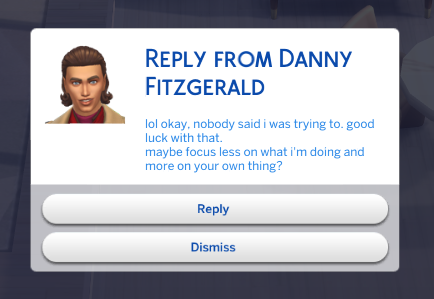
Text message from a close friend in casual, candid tone
From a close friend
Casual, candid, easy banter.
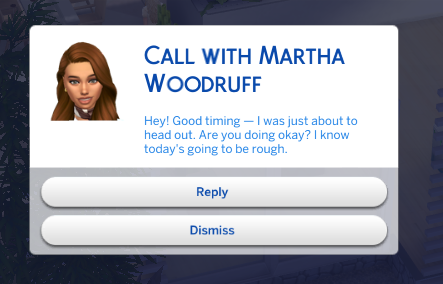
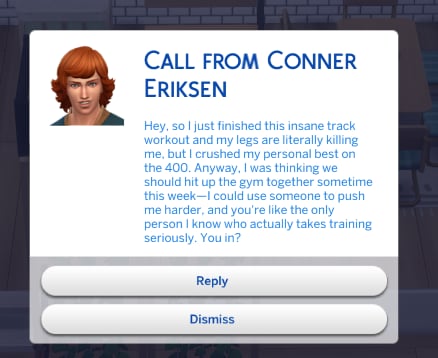
Call referencing a real in-game event the player's sim just did
Knows what just happened
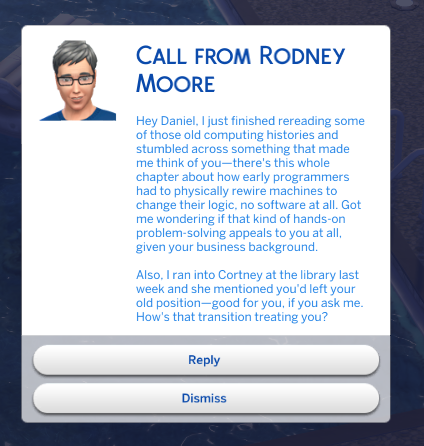
References real life events — quit jobs, promotions, breakups.
Call referencing an upcoming funeral both sims are attending
Knows what's coming up
References upcoming funerals, weddings, holidays — naturally, never invented.
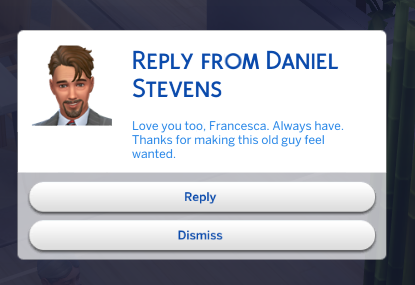
Text message from an elder partner — warm, affectionate, full sentences
From a partner
Warm, affectionate, age-appropriate tone.
Text message from an enemy in cold, hostile tone
From an enemy
Cold, dismissive, no warmth.
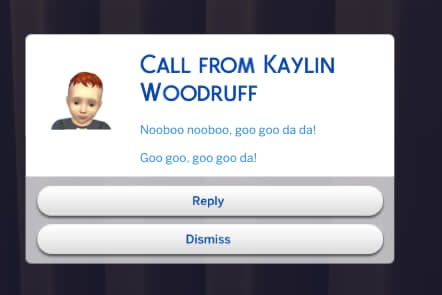
Phone call from an infant babbling goo goo ga ga
Unpredictable moments
Yes, the baby called. Yes, it was babbling.

Messages move relationships, world context, sim bios, service NPCs (v3.6)

Flirty and warm texts now nudge the game's own friendship and romance bars. Plus player-authored context that shapes every prompt, hired service NPCs that write in the right register, and a fifth AI provider option.
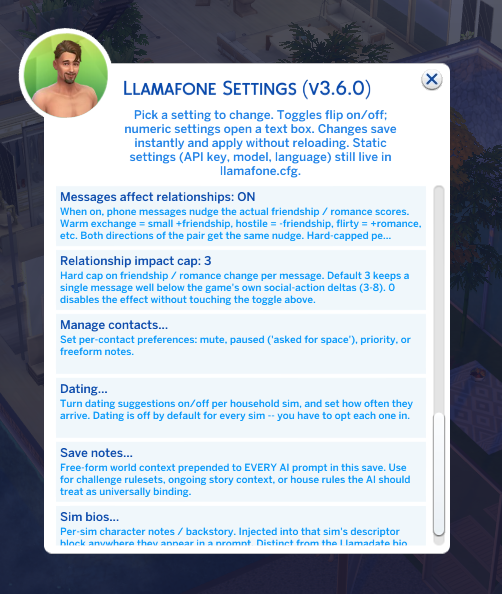
Llamafone Settings menu showing new v3.6 rows: Save notes, Sim bios, Messages affect relationships toggle, and a relationship-impact cap slider
New knobs
Save notes, sim bios, and the relationship-impact toggle all live under Settings alongside the existing controls.
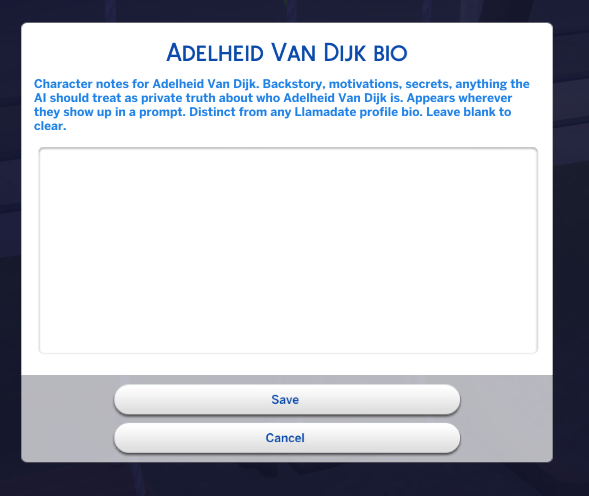
Sim bio input dialog where the player types character notes for a specific sim
Bios you write yourself
Backstory, motivations, secrets, quirks — anything you want the AI to know about who this sim really is. Every call, text, or reply involving them reads from it.
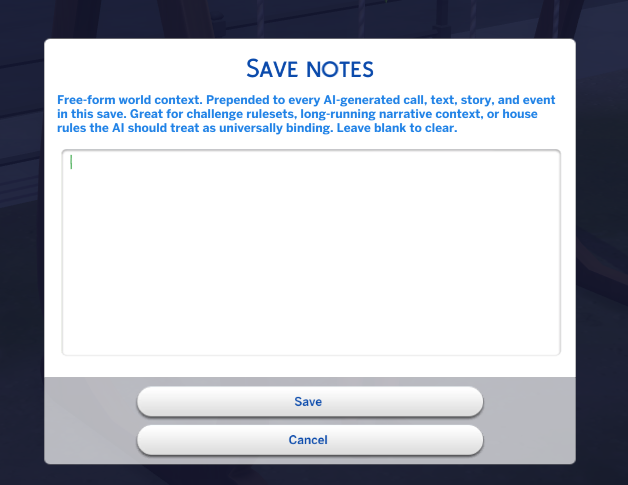
Save-level world context dialog where the player writes free-form notes that shape every AI prompt in this save
World context, save-wide
One field, injected as the top-priority instruction in every prompt. Set the era, the challenge rules, whatever binds the whole save.
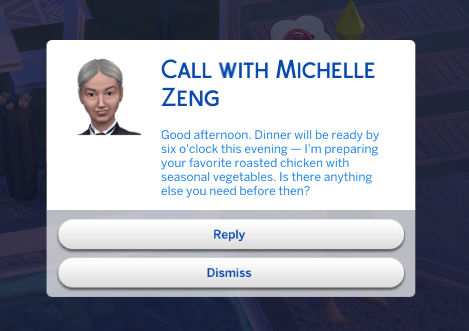
Text from a butler NPC written in professional, deferential register referencing household dinner arrangements
Your butler sounds like your butler
Hired service NPCs stay in role — formal for butlers, task-focused for maids, kid-first for nannies, plant-talk for gardeners.
Sim relationship panel showing the romance bar growing after flirty text exchanges
Romance and friendship build where they should
Flirty back-and-forth fills the romance bar; warm banter fills friendship. The game's own relationship bars respond to how the conversations actually go.
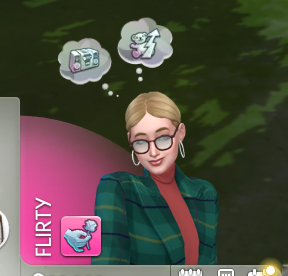
A flirty text exchange between two sims building romantic tension through the messages
The flirting is real
Now your sim builds relationships while their phone call gives them butterflies.

Standalone app + Llamadate (v3.5)

Llamafone got its own tile on the phone. And inside: Llamadate. Opt in, browse profiles, message someone, or wait for a match to slide into your DMs.
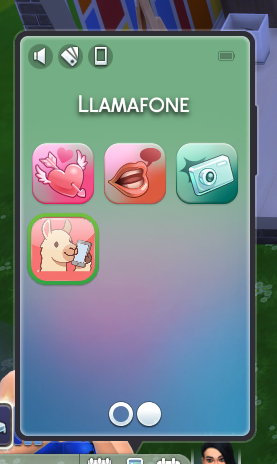
Llamafone's llama icon as a standalone app tile on The Sims 4 phone home screen, next to other apps
Its own home-screen tile
The llama's on the phone home screen. No more digging through Social.
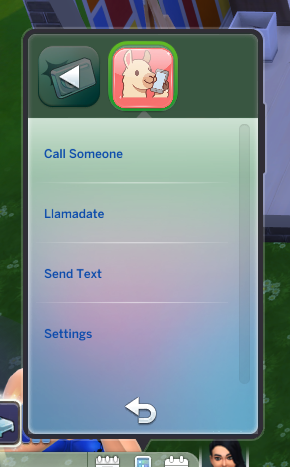
The Llamafone app screen showing its four tiles: Call, Send Text, Llamadate, and Settings
Everything under one llama
Call, text, date, tweak settings — all in one app on your sim's phone.
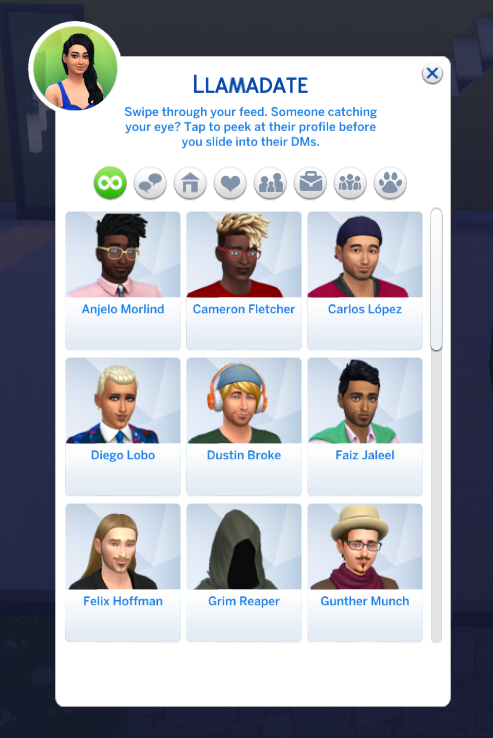
Sim picker titled Llamadate showing portraits of unmet sims to potentially message
Swipe through the town
A rotating feed of sims your sim hasn't met yet.
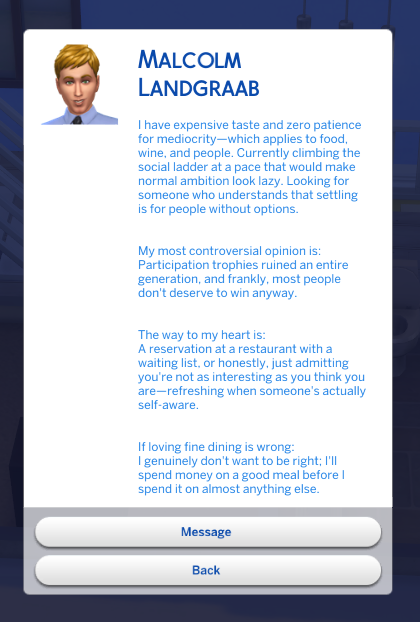
Sim's dating profile card with a short bio at the top and three prompt-and-answer pairs below in Hinge style
Their opening pitch
Bio and three prompts, in the sim's voice.
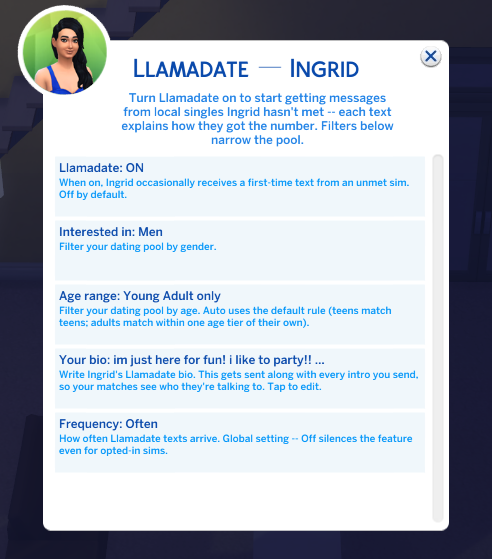
Llamadate settings for a specific sim: opt-in toggle, gender filter, age filter, and a bio field
Set it up per sim
Opt-in, gender, age, and a bio you write yourself. Each played sim gets their own.
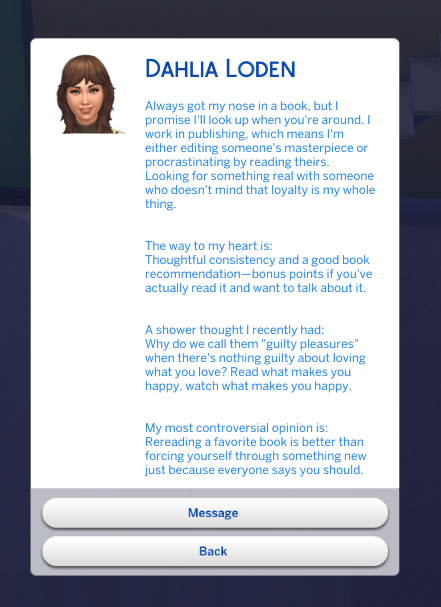
Dahlia Loden's Llamadate profile: a bookworm working in publishing, looking for something real
The bookworm
Publishing lifer looking for the long game.
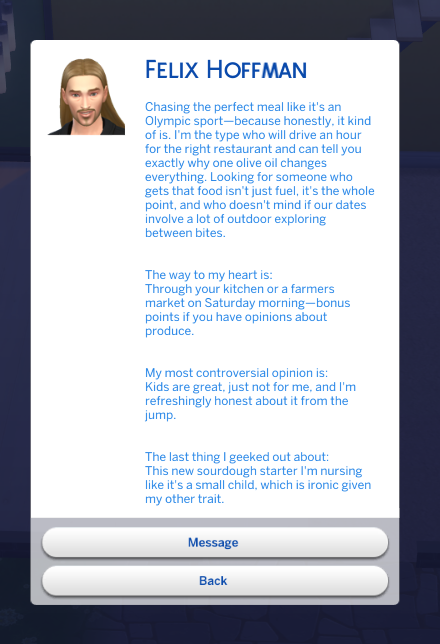
Felix Hoffman's Llamadate profile: a food-obsessed, outdoorsy, child-free sim
The foodie
Chases the perfect meal like it's a sport.
A reply from a Llamadate match responding to the player's intro
They actually read your bio
Reactions weigh what you wrote against their vibe. Sometimes they're into it. Sometimes they're not.
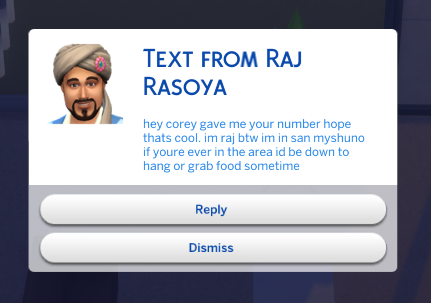
An inbound cold-outreach text where the sender was introduced through a mutual friend
Friend of a friend
When you share a mutual, the intro comes through them.
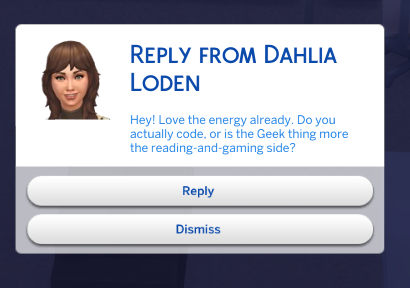
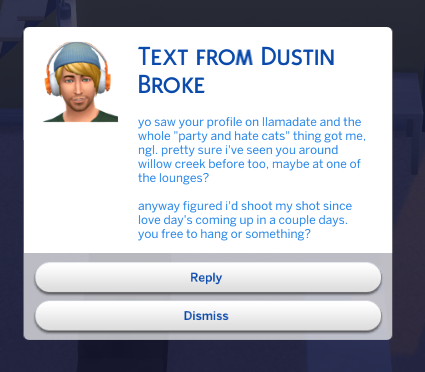
Inbound cold-outreach text from a total stranger who saw the player's profile on Llamadate
Or a total stranger
No mutual? Llamadate itself is the intro — with a plausible IRL detail to make it land.

Per-relationship contact preferences (v3.4)

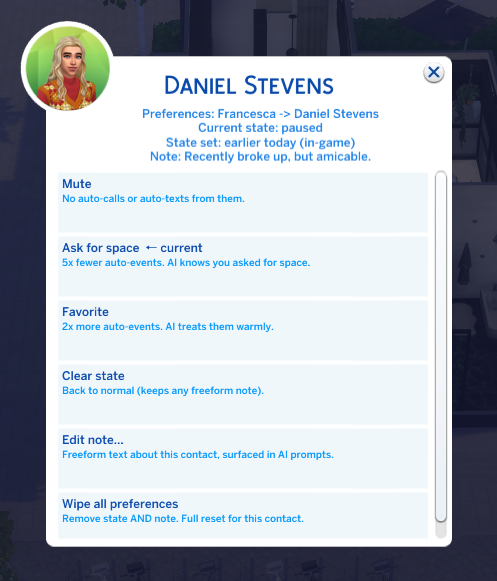
Alice broke up with Chad. She wants him to stop calling her every hour. She doesn't want him gone from the game — just from her phone. Bob (her brother) is still friends with Chad and should keep getting his texts. This is what per-relationship preferences are for: mute, "asked for space," or favorite — scoped to a specific household member's view of a specific contact.
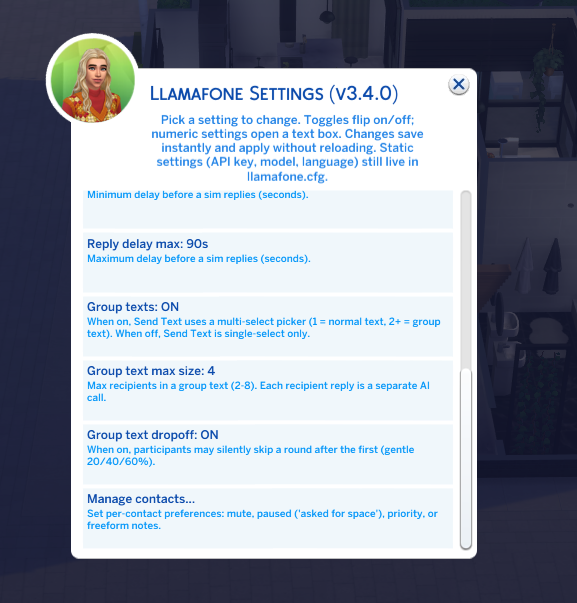
Llamafone Settings panel with a new Manage Contacts row
Reached from Settings
Phone > Social > Llamafone Settings > Manage contacts. Scoped to whichever household sim opened Settings.
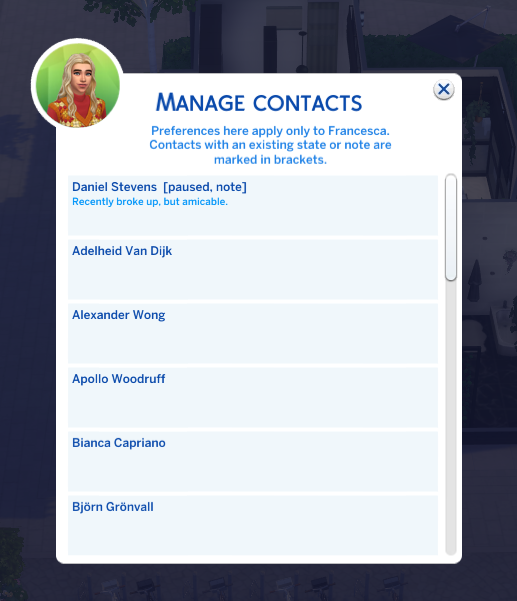
Sim picker listing contacts with markers for those that have preferences set
Contact list with markers
Contacts with an existing state or note surface first, tagged in brackets ([paused], [muted], note).
Per-contact action picker with mute, paused, priority, clear, and note options
Per-contact actions
Mute, Ask for space, Favorite, Clear, Edit note, or Wipe. The current active state is marked with ←.
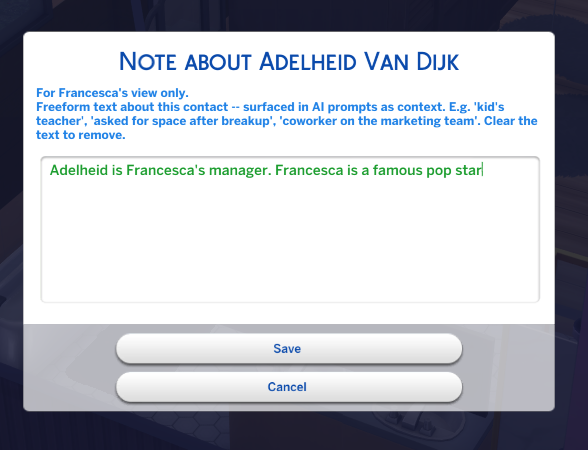
Text input dialog for a freeform note about a contact
Freeform notes
Any context you want the AI to know — "kid's teacher," "asked for space after breakup." Surfaced in every prompt for this pair.
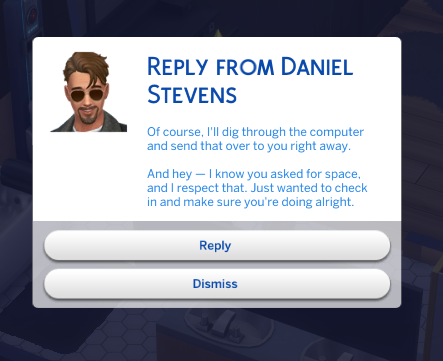
A text message from a contact respecting the player's request for space
Here's what changes
Once paused is set, the AI knows about the boundary. A decent contact respects it; a love-heavy ex might ignore it; a mean one might guilt-trip.

The paused ("asked for space") state is the interesting one. Instead of blocking the contact, it drops their auto-event rate to 20% and tells the AI you asked for space — so their response is driven by who they are. Also: the mod auto-detects distance signals in messages ("leave me alone," "we're done," "need space") and sets the state for you.

Group texts (v3.4)

Send one message to 2–4 sims at once. Each recipient replies in their own voice, staggered like real texts arriving over a few minutes. Every reply sees what the others just said — so responses stay distinct instead of a chorus of "same." The dialog title and the reply prompt both list the full group roster, so you always know who you're talking to.
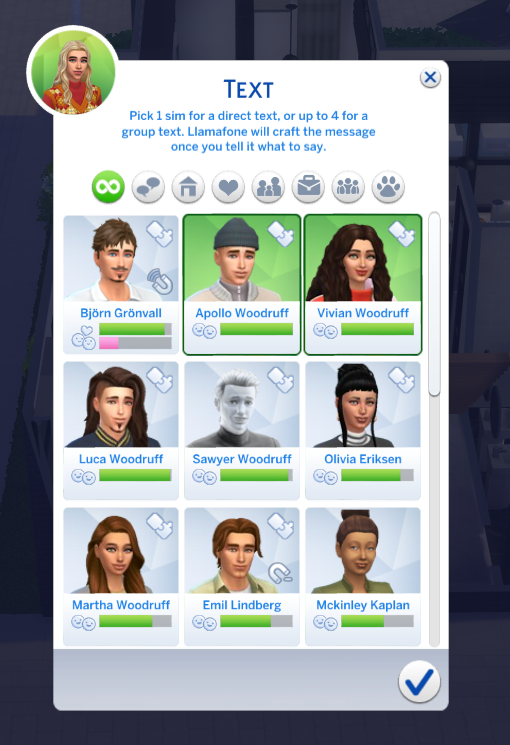
Multi-select sim picker allowing 1 to 4 recipients
Multi-select picker
Same "Send Text" entry as before — now picking 1 sim gives a normal text, picking 2–4 starts a group thread. Checkboxes replace the radio buttons when the picker's in group mode.
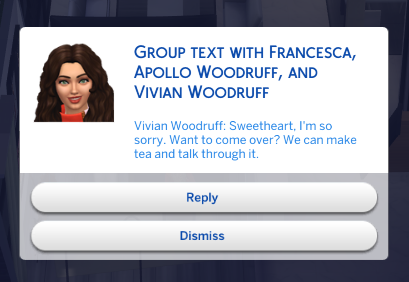
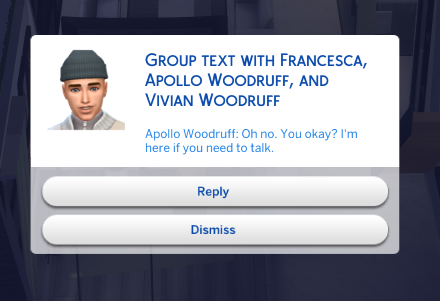
Incoming group text with the full roster shown in the dialog title
Roster visible on every message
Title reads Group text with Sarah, Bob, Alice, and Kate. The message body is prefixed with the sender's name so you always see who just spoke.
A different group member's reply arriving in the same thread
Staggered replies from everyone
Each recipient's reply lands after its own randomized delay (same delay range as 1:1 texts). Serial, not parallel — so participant B's prompt includes what participant A just said.
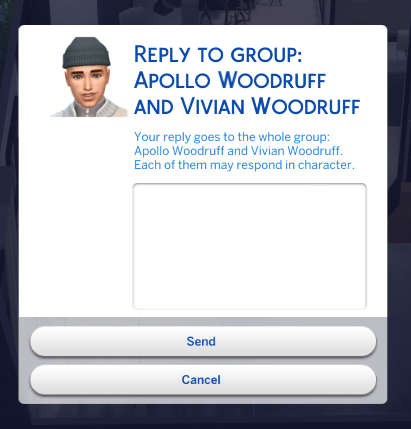
Reply dialog explicitly listing the whole group as the destination
Reply fans out to the whole group
The Reply button opens a dialog that spells out your reply goes to the whole group: Sarah, Bob, Alice, and Kate. Each active participant may respond to the next round.

A briefing call at group creation (using the default model) synthesizes each participant's voice and their web of relationships, then gets cached for every subsequent reply — so per-turn cost stays sane even over long threads. Persisted per-save in GroupTexts.json so quitting mid-thread doesn't lose it.

Now in your sim's phone (v2.0)

No cheat console required for everyday use. Call, text, and tweak settings from the in-game phone the way your sim would.
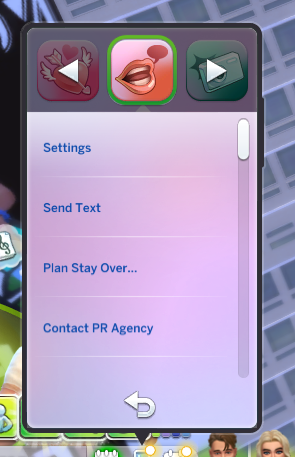
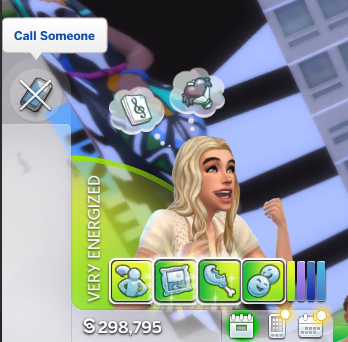
Phone Social menu showing Settings, Send Text, and other Llamafone options alongside base game items
Phone > Social
Call Someone, Send Text, and Settings live next to the base game's phone options.
A sim with the Call Someone interaction queued in their action bar
Queues like any action
Call Someone slots into your sim's action queue alongside their other plans.
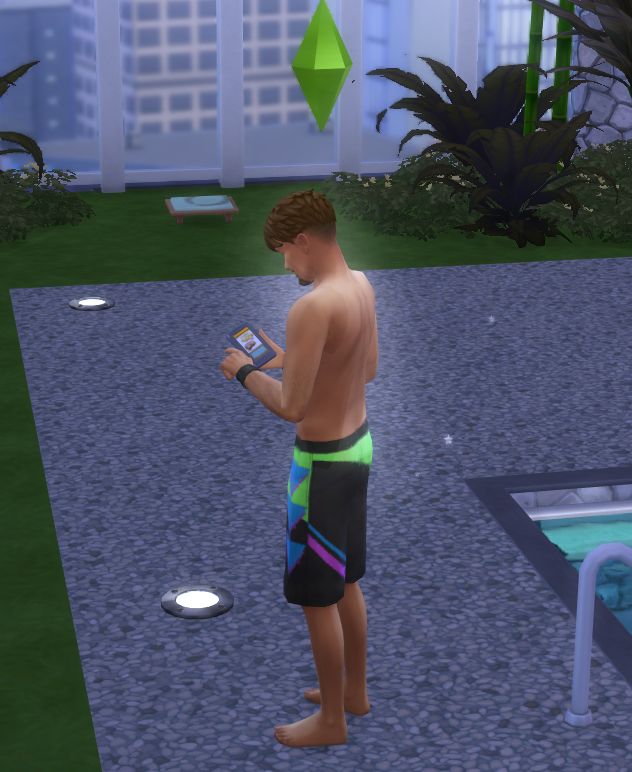
A sim standing outside actually using their phone — the brief phone-tapping animation plays as the interaction runs
Plays the phone animation
Your sim actually pulls out their phone and uses it while the picker opens.
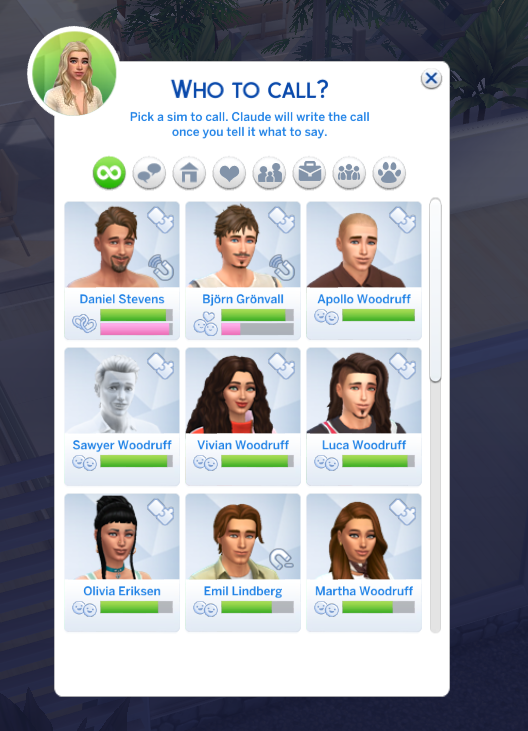
Sim picker dialog titled Who to call with portraits of contacts
Pick a recipient
A real sim picker scoped to your contacts — household + relationships above the friendship threshold.
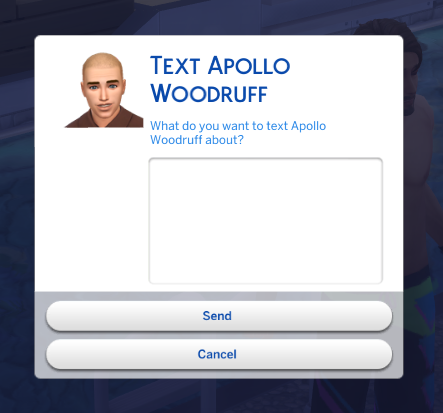
Text dialog with the contact's portrait and a multi-line text area for composing the message
Type what you want to say
Multi-line text area with the recipient's portrait. the AI crafts the message in their voice from what you wrote.
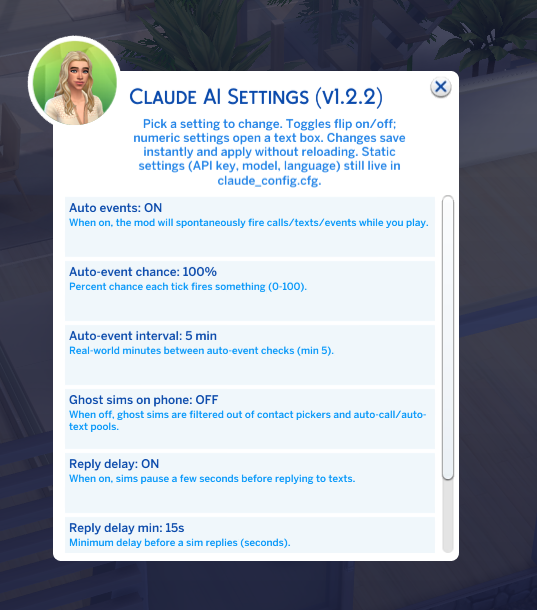
Llamafone Settings panel showing toggles for auto events, reply delay, ghost contacts, and numeric inputs for chance and interval
Settings, in-game
Toggle auto-events, reply delays, ghost contacts; adjust chance and interval. Writes back to llamafone.cfg, preserving your comments.

It knows what's actually going on.

Every call and text is filtered through what's true in your save right now — not generic AI fill.

Geography aware

If a sim lives in your world, they'll suggest grabbing coffee. If they live in San Myshuno and you're in Willow Creek, they keep it long-distance — no "come over" from across the map.

Weather aware

Live read of the weather where each sim actually is — light rain, blizzard, heatwave, thunderstorm. Dramatic weather comes up in conversation; routine weather stays background. Off-world callers know THEIR climate too, so Sulani friends won't pretend it's snowing during a globally-Winter season.

Life events show up

Sim quit a job, got promoted, had a baby, got married, aged up? The mod catches it automatically and your friends bring it up — "heard you quit, you good?" — within days of it happening.

Knows who's at work

Text your sim's dad while he's on shift at the hospital and he might write back "sorry, at work, catch you later" — not generic small talk. Reads live career state — currently at work, or should be but isn't — plus school schedules for teens and kids, so people who should be busy sound busy.

Service NPCs stay in role

The butler, maid, babysitter, gardener, and repair tech write in the right register. Butlers stay professional and deferential; maids talk supplies and schedules; babysitters check in on the kids; gardeners talk plants and season; repair techs quote parts and timing. The mod reads the household's live service records so a hired NPC calling about tomorrow's schedule lands like they should, not like a random friend.

Parties, weddings, holidays

Sims 4 drops calendar events from the UI the moment they end. Llamafone snapshots them. Text a guest the morning after a house party — "great party last night." Text your ex the day of a funeral you both attended. Love Day and Winterfest come up on the day.

Recent hangouts remembered

When your sim actually chats, flirts, argues, or kisses another sim in-game, the mod logs it. Next time you text or call, the AI knows you saw each other in person — so the opener is "great catching up earlier," not generic small talk. Uses the same Sims 4 relationship bits (Just Chatted, Just Kissed, Social Context) the game itself tracks.

Family roles override traits

Your Outgoing Adventurous dad doesn't text you like a frat bro — he texts like your dad. Parents sound parental, siblings tease, spouses get intimate, grandparents ramble warmly. Traits are interests, not voice.

Friendship tone is law

Friends are warm. Acquaintances are polite. Enemies are openly hostile — no "rooting for you 💕" from someone who hates your guts. The current relationship beats anything from old chat history.

Your notes, your context

Write a freeform note on any contact — "kid's teacher," "asked for space after breakup," "boss's boss," "childhood best friend." Surfaced in every prompt for that pair, weighted heavily, so the AI stays in character on nuance the game itself can't label. Per household member — Alice's notes stay Alice's.

Boundaries carry through

Tell a sim "leave me alone" or "we're done" and the mod auto-detects it — flips them to muted or paused for that household member. Or set it manually in the Contacts UI. Every subsequent AI prompt for that pair leads with the boundary, not with warmth. A love-heavy ex ignores it and keeps calling; a decent friend apologizes; a mean one guilt-trips. The drama plays out based on who they are.

Group thread memory

When Alice later texts Sarah 1:1, the AI knows they were both just in a group text with Bob and Kate. The last few turns from that group thread land in the prompt — so 1:1 conversations reference shared context like real friend groups do. Runs both directions, capped to recent threads only.

What time it is

Every prompt now carries the current in-game clock — 7:15 PM (evening), 9:03 AM (morning), etc. No more "dinner ready by six" from your butler when it's already 7. Times of day sound like real times of day, and future-tense references (tonight, tomorrow, next week) land in the right window.

Remembers how they met

Match with someone on Llamadate today, text them three in-game weeks later, and the AI still knows the origin — that's how they'll bring it up. Mutual-friend intros remember the mutual's name too. Stored on the pair alongside contact preferences, ready for future asymmetric events (who kissed who, who proposed to who).

Commands at a glance

Open the cheat console with Ctrl+Shift+C, type a command, press Enter.

Phone

  • llama.call — incoming call
  • llama.text — incoming text
  • llama.sendtext Bella Goth hey!
  • llama.sendcall Bella Goth I have news
  • llama.reply <message>

Storytelling

  • llama.story — narrative update
  • llama.storyline — 3-act arc
  • llama.storyline_theme romance
  • llama.drama — household drama
  • llama.dialogue — in-character lines

Events & goals

  • llama.event — random event
  • llama.goals — session goals
  • llama.challenge — gameplay challenge
  • llama.auto_events on

System

  • llama.status — setup & all commands
  • llama.chat <message> — freeform
  • llama.journal — recent history
  • llama.reload — after editing config

Get started

  1. 1

    Download the mod

    Two places to grab it, same files either way — CurseForge (recommended for most players) or the GitHub releases page. You need three files: Llamafone.ts4script (the script), Llamafone.package (the phone UI tunings), and llamafone.cfg (the settings file).

  2. 2

    Pick an AI provider and get a key

    Llamafone works with five different AI providers — pick whichever fits your budget, preferences, or paranoia. You only need credentials for the one you pick. Ollama is free because it runs entirely on your computer.

    🧡 Anthropic Claude

    What the mod was built and tuned against.

    1. Go to console.anthropic.com and sign up
    2. Verify email/phone if asked
    3. Add a credit card under Settings → Billing and load $5 minimum (~1,000 in-game calls)
    4. Go to API Keys, click Create Key, name it "Sims 4 mod"
    5. Copy the sk-ant-api03-… key immediately — you only see it once

    In llamafone.cfg: provider = claude

    💚 OpenAI (GPT)

    Works with any GPT model — gpt-4o, gpt-4o-mini, gpt-4-turbo.

    1. Go to platform.openai.com/api-keys and sign in (or sign up)
    2. Add billing under Settings → Billing; load credit ($5 minimum)
    3. On the API Keys page, click Create new secret key
    4. Copy the sk-… key — only shown once

    In llamafone.cfg: provider = openai + set default_model = gpt-4o-mini

    🔷 Google Gemini

    Has a generous free tier — you can play for a while without a card on file.

    1. Go to aistudio.google.com/apikey and sign in with a Google account
    2. Click Create API key (free tier requires no billing setup)
    3. Copy the AIza… key

    In llamafone.cfg: provider = gemini + default_model = gemini-1.5-flash (free tier) or gemini-1.5-pro

    🔀 OpenRouter one key, many models

    Aggregator that proxies dozens of models (Claude, GPT, Llama, Mistral, DeepSeek, etc.) behind one API key. Useful if you want to A/B-test models without juggling separate accounts.

    1. Go to openrouter.ai and sign up
    2. Add credits under Settings → Credits ($5 minimum)
    3. Go to openrouter.ai/keys and click Create Key
    4. Copy the sk-or-… key

    In llamafone.cfg: provider = openrouter + default_model = anthropic/claude-haiku-4-5 (browse the full catalog at openrouter.ai/models)

    🦙 Ollama (local — no API key) techy

    Runs on your own computer. No API key, no internet, no cost. More setup than the cloud options — you install Ollama, keep it running in the background, and pull a model yourself.

    1. Install Ollama. Make sure the tray icon stays running.
    2. Pull a model — e.g. ollama pull llama3.2:3b (small, fast) or a bigger one if your hardware handles it.
    3. Leave api_key blank.

    In llamafone.cfg: provider = ollama + default_model = llama3.2:3b (must match ollama list). Run llama.testconnection in the cheat console to verify setup.

    Treat your API key like a password. Anyone who has it can spend money on your account.
    • Save it in a password manager (1Password, Bitwarden, your browser) — not in a plain text file on your desktop.
    • Never paste it in Discord, Reddit, GitHub, screenshots, or any chat — even private DMs aren't safe long-term.
    • If it ever leaks, revoke it on the provider's dashboard and make a new one.
  3. 3

    Drop the mod files in your Mods folder

    Move both downloaded files into:

    Documents/Electronic Arts/The Sims 4/Mods/

    If you have Sims 4 mods already, you've been here before — same folder.

  4. 4

    Set your provider + API key in the config

    Open llamafone.cfg with any plain text editor (TextEdit, Notepad, VS Code — anything that saves plain text). Two lines to update near the top:

    provider = claude          # or: openai, gemini, openrouter, ollama
    api_key  = YOUR_API_KEY_HERE

    Replace YOUR_API_KEY_HERE with the key you copied. Examples per provider:

    provider = claude
    api_key  = sk-ant-api03-Xy7…
    
    # or
    
    provider = openai
    api_key  = sk-proj-…
    
    # or
    
    provider = gemini
    api_key  = AIza…
    
    # or
    
    provider      = openrouter
    api_key       = sk-or-…
    default_model = anthropic/claude-haiku-4-5   # vendor/model form -- see openrouter.ai/models
    fast_model    = anthropic/claude-haiku-4-5
    
    # or (no key needed)
    
    provider      = ollama
    api_key       =
    default_model = llama3.2:3b     # must match the model you pulled -- see `ollama list`
    fast_model    = llama3.2:3b

    Save the file. If you're on Ollama, also confirm ollama_endpoint = http://localhost:11434 matches wherever your server runs. Ollama users can run llama.testconnection in the cheat console after loading a save — it verifies Ollama is reachable, the model is downloaded, and end-to-end generation works.

  5. 5

    Enable script mods & launch the game

    In The Sims 4, open Game Options → Other and tick both:

    • Enable Custom Content and Mods
    • Script Mods Allowed

    Restart the game. When the main menu loads, you'll see a notification popup confirming the mod is active.

    Inside any household, open the cheat console with Ctrl+Shift+C and type llama.status to see all the commands and confirm everything's wired up.

Common questions

Why use AI in The Sims 4?

For storytelling. The base game's phone calls and texts are limited dropdown options — useful for gameplay, repetitive for narrative. This mod replaces them with text written specifically for your household by the AI provider you configure (Claude, OpenAI, Gemini, or local Ollama).

If you're a storytelling-focused player who's tired of the same scripted lines and wants your sims' relationships to feel alive, this is for you.

Does this affect my saved game?

No. The mod doesn't modify your saves, sims, or world. It only reads game data (who lives in the household, their traits, careers, and relationships) and shows generated text in notification popups and phone dialogs.

Generated content is saved separately in Llamafone_Journal.json inside your Mods folder, so the AI can reference past interactions across sessions. Uninstalling the mod removes everything cleanly — delete the .ts4script, config, and journal files.

What does the AI know about my sims?

Just what's needed for the current command — names, ages, traits, careers, aspirations, household members, and relationship history. Nothing personal about you, no real names beyond what your sims are named, no save file contents.

Your prompts go from your computer directly to whichever AI provider you configured — there's no middleman server. Each provider has its own data-retention policy: Anthropic, OpenAI, Google, and OpenRouter all state that paid API traffic is not used to train models. If you really don't want any data to leave your machine, use Ollama — it runs entirely locally.

Is my API key safe?

Yes. The key lives only in llamafone.cfg on your computer. It's never uploaded anywhere except to make the API call to whichever provider you chose. The mod doesn't have a server, doesn't phone home, and isn't open to anyone else.

That said, treat the key like a password — don't paste it in screenshots, Discord, or screen-shares. If you ever suspect it leaked, revoke it on your provider's dashboard and make a new one. (Or just switch to Ollama — no key, no exposure.)

Can I disable specific features?

Yes. Everything is opt-in. Auto-events (random calls/texts/stories while you play) can be toggled with llama.auto_events off in the cheat console. You can also edit llamafone.cfg to disable specific auto-event types, change interval/chance, or restrict which sims can call you.

If you don't run a command, nothing happens. The mod is dormant until you trigger it.

Does it work on Mac?

Yes — drop the .ts4script into ~/Documents/Electronic Arts/The Sims 4/Mods/ and it works identically to Windows. Same commands, same behavior.

How much does it cost?

You pay your AI provider directly for what the mod actually uses — there's no subscription to me or anyone else. Cost depends on which provider you pick:

ProviderModelPer call
Anthropic Claudeclaude-haiku-4-5~$0.005
Anthropic Claudeclaude-opus-4-8~$0.05–0.15
OpenAIgpt-4o-mini~$0.003
OpenAIgpt-4o~$0.03
Google Geminigemini-1.5-flashfree (rate limited)
Google Geminigemini-1.5-pro~$0.01
Ollama (local)any modelfree (uses your GPU)

A typical session of ~30 calls on Claude Haiku or GPT-4o-mini lands around 15-25 cents. Heavier sessions with long-form storyline generation run a dollar or two on the premium models. Gemini's free tier covers most casual play. Ollama is fully free if you've got the hardware.

Does this slow down the game?

No. All API calls happen on background threads, so the game keeps running while text is generated. You'll see a notification popup when the response arrives, usually within a few seconds.

What if I'm offline?

The mod needs an internet connection to call the AI provider. If you're offline, commands silently fail without interrupting your game — no crashes, no popups. Your sims still play normally; you just won't get AI-generated content during offline sessions.

Is this against the Sims 4 Terms of Service?

No. The Sims 4 supports script mods officially through its Mods folder and Custom Content settings. This mod uses the documented script-mod system and doesn't modify any game files. EA's stance on script mods is that they're allowed; they just won't support issues that occur while mods are installed.

What's new

Recent changes from the dev branch — the mod's actively maintained.

  1. August 16, 2026

    Messages move relationships, custom world context, sim bios, service NPCs, OpenRouter (v3.6)

    Player-authored context you can pass into every prompt, messages that actually move friendship and romance, service-NPC roles, time-of-day awareness, and a fifth AI provider. Drop-in over v3.5.

    New:

    • Save notes. One free-form text field per save, prepended to every AI prompt as WORLD CONTEXT. Use it for challenge rulesets, long-running narrative context, or house rules the AI should treat as universally binding. Under Llamafone → Settings → Save notes.
    • Sim bios. Per-sim character notes — backstory, motivations, secrets, quirks — that get injected into that sim's descriptor block anywhere they appear in a prompt. Distinct from the Llamadate bio (dating-facing) and the per-relationship contact note (scoped to one pair). Under Llamafone → Settings → Sim bios. Travels with the save.
    • Service NPCs stay in role. Hired butlers, maids, babysitters, nannies, gardeners, and repair techs now write in the right register — butlers professional and deferential, maids task-focused, babysitters kids-first, gardeners talking plants and season, repair techs quoting parts and timing. Layered detection reads the household's live service records, the active zone's situation manager, direct household attributes, and the sim's career track, so it works across pack combinations. When a hired service NPC is on shift, the prompt says "currently on shift as the household's butler" instead of the generic "at work right now" — no more contradictions when you call your live-in butler.
    • Messages move relationships. Warm, flirty, hostile, or otherwise emotionally-charged messages now nudge the actual Sims 4 friendship and romance tracks — bidirectional, hard-capped, tunable. Default cap is ±3 per message, well below the game's own social-action deltas, so exchanges accumulate naturally without one text reshaping a relationship. Toggle and cap under Llamafone → Settings.
    • Time-of-day awareness. Every prompt now includes the current in-game clock (e.g. [CURRENT IN-GAME TIME: 7:15 PM (evening)]). No more "dinner ready by six" replies when it's already 7. Same for morning / afternoon / night phrasing.
    • Llamadate origin persists across sessions. When two sims connect via Llamadate, that fact is now stored on both sides of the pair and referenced in every future prompt between them. Reconnect with a match three in-game weeks later and the AI still knows how you met. Includes mutual-friend intros (records the mutual's name too). Stored alongside contact preferences in a structure ready for future asymmetric events (who kissed who, who proposed to who, etc.).
    • OpenRouter provider support. Fifth provider option in llamafone.cfg: one API key, dozens of models (Claude, GPT, Llama, Mistral, DeepSeek, etc.) via vendor/model naming. Useful if you want to A/B-test models without juggling separate accounts.
    • Update-mod button in the startup notification. When a newer release is on GitHub, the startup popup now has an "Update now / Later" dialog. "Update now" opens the CurseForge project page in your default browser.

    Bug fixes and polish:

    • Llamadate matches now know your name. The bio-only privacy block was worded so vaguely ("this is ALL you know about them") that AI-driven matches occasionally asked what your sim's name was, even mid-conversation. Now explicit: they know your first name from your profile and can't ask.
    • Llamadate initial friendship boost tuned down. Reduced from +15 to +5 on both sides at match, so subsequent messages have room to grow the relationship naturally under the new per-message impact.
    • Llamadate outreach no longer fakes IRL sightings. Cold outreach messages used to open with "I swear I saw you at the coffee shop last week" or "I think we do the same gym" even for total strangers. Fixed — the sender stays in-character as someone who found an interesting profile online, no fabricated past encounters.
    • Long-distance calls and texts now engage with your in-person visit proposals. The "different worlds" rule used to make sims push back three messages in a row when the player suggested "come see me this weekend." Now there's an explicit exception: when you propose a visit, the AI says yes, negotiates timing, or expresses excitement instead of stonewalling.
  2. August 9, 2026

    Standalone app + Llamadate dating (v3.5)

    Two big features and a stack of bundled bug fixes. Drop-in over v3.4.2.

    New:

    • Standalone app on the phone. Llamafone has its own home-screen tile now, with Call, Send Text, Llamadate, and Settings all inside it. No more digging through Social.
    • Llamadate. An opt-in dating layer, per played sim. Set your bio, browse Hinge-style profiles, message someone, or wait for a match to text you. Every played sim has their own opt-in toggle, gender filter, and age filter. If you write a bio, matches see only that — not your career, engagement, aspirations, or traits. Reply-gated: interested replies add the sim to your contacts, polite declines don't. Committed sims (married, engaged) are filtered out of the pool on both sides. Mutual-friend intros only fire when there's a real friendship between the mutual and both parties. A sim who has cold-outreached you is excluded from your future pool permanently.

    Bug fixes bundled since v3.4.2:

    • Breakup context finally lands in prompts. Broken engagements, bad-romance bits, cheating history, and sentiments like "Bitter Over Phone Breakup" now surface in the AI prompt with direction preserved ("you feel bitter toward them," "they cheated with you"). Previously an ex showed as "close friends" and the AI had no idea you'd broken up — you'd get a warm "great to hear from you!" reply from a sim you dumped an hour ago. Affects every text and call in the mod, not just Llamadate.
    • Save-id resilience. Sims 4's persistence service occasionally reports a sentinel slot id during transient CAS / menu / interaction hooks. Prior behavior: mod created a bogus Slot_ffffffff/ folder OR silently dropped writes. Now it rejects sentinels AND falls back to the last-known-good save id while a zone is loaded — restoring journal, past-events, interactions, and dating writes during those windows.
    • Career switch detection. Your sim changing careers now flows into the milestone scan + prompts + journal correctly.
    • Wedding scan TypeError for My Wedding Stories couples with non-standard role naming (Host_Couple).
    • Journal preview cap raised (700 chars, was 220) so recent conversation context isn't truncated when the AI needs to reference it.
    • Journal silent-save-failure now logs. If a per-save write drops for any reason, the log file records it so you can diagnose instead of silently losing entries.
  3. August 7, 2026

    Bug fix and polish release (v3.4.2)

    Drop-in over v3.4.1.

    • Gemini users: replies come back complete. If you were on a Gemini model and seeing your sims send back short, cut-off, or completely empty texts, that's fixed. Full replies again.
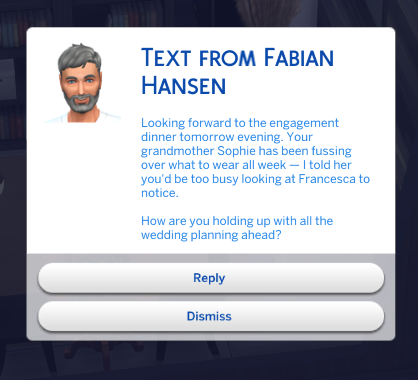
    • Sims know which wedding event they're going to. Every wedding sub-event you planned — engagement dinner, rehearsal dinner, ceremony, reception, bachelor/bachelorette party — was showing up to the AI as the same generic "wedding event." Now they get the specific one, so a text about tomorrow's rehearsal dinner sounds like a rehearsal dinner, not a wedding. The same resolver may help other packs' scheduled events (funerals, planned parties, dine-out reservations) if they follow the same tuning convention, but only weddings have been directly confirmed on this release.
      Text conversation referencing an engagement dinner specifically, not just a generic wedding event
      Real in-game example — the prompt now says Engagement Dinner, not Player Planned Wedding.
    • Cleaner holiday and event names in sim conversations. Vanilla holidays used to leak into prompts as "Premade Holidays Harvestfest"; modded holidays showed up with their author's mod prefix attached. Both cleaned up — the AI sees "Harvestfest" and the modded holiday's actual name. Past events are similarly cleaner (no more "Custom Goals Pre Post Wedding Parties Engagement Dinner"), and when the same event was recorded through two internal paths, the duplicate lines are merged.
    • "How long ago" phrasing is correct now. Every "N sim days/hours ago" phrase in prompts was off by 40× because the mod's internal tick-math constant was wrong. An event from 3 sim days ago used to read as "86 minutes ago" and got labeled "today." Verified against the game's own live clock this time, and a runtime self-check now watches for drift so this can't silently break again.
    • Family reunion (and similar) no longer stuck showing as "today" forever. Related to the tick fix above: the internal recorder was also rewriting an event's start time to "now" every time it noticed the situation, so a reunion from days ago kept looking like it just happened. Both bugs are gone.
    • Honored-sim phrasing matches the event. "In memory of" is now reserved for funerals. Weddings, birthdays, and other honored-sim events use appropriate phrasing — "for", "honoring", or the honored sim's name in possessive form.
    • Outgoing texts and calls no longer silently fail. If a past event with honored sims was surfaced in the prompt (weddings, funerals, birthdays after the wedding sub-event fix), the send would dispatch and then nothing would happen. Fixed — outgoing sends now go through even when the events context is fully populated.
    • "FAILED TO LOAD" line in the log is gone. The mod was actually loading fine — a harmless startup call was mis-reporting itself as a fatal error and scaring people. Cleaned up.
    • Log files stay smaller during long play sessions. A diagnostic line was repeating on every AI prompt for certain sims — now logs once per sim per session.
    • Sims know when they (or you) are at work or in class. If a sim is currently on the clock or at school when the prompt is built, the AI sees it and can react in-character — "hey, in class, catch you at lunch" or "sorry, just got to work, later?" — instead of writing a paragraph as if they're free. Covers regular work careers, active careers, part-time gigs, and schools (grade school, high school, university).

What's next

Where the mod is heading. Not a contract — priorities shift based on what you all report and ask for.

Found a bug? Tell me.

The mod is actively maintained and bug reports get read. Use the form below and you'll be filling out a GitHub issue with structured fields (what happened, log excerpt, screenshots) — no GitHub experience required, just sign in.

Report a bug

Or browse existing reports first to check if it's already known.

Love the mod? Support it on Patreon.

The mod is free and always will be. If it's making your save more fun, throwing a few dollars on Patreon helps me keep building it — new features, bug fixes, and weirder ideas like AI-generated neighbours and on-the-fly storylines.

Become a patron

Prefer Bitcoin? Scan or copy the address:

Bitcoin donation QR code 351FwouuUN7QRNGy6iDXXFwr7rgt4qDnHx